
traVRsal is designed as more than a fixed set of levels. Its world format and public Unity SDK let creators use the same impossible-space foundation for new stories, challenges, galleries, multiplayer ideas and spatial experiments.
An ordinary VR level starts from one global map. An adaptive traVRsal world starts from zones and rules: what must remain fixed, what can rotate, which exits may connect, how much clear floor a module requires and what should happen when a player crosses a transition.
This changes the creative question. Instead of asking only “what building should I model?”, you can ask “what sequence of places should a player physically walk through, and how can those places be rearranged for different rooms?” The impossible-space engine handles repeated use of the tracked floor; your world supplies the art, pacing and interaction.
The promise
Walk through impossible worlds. Then build your own. Players become creators, and one locomotion system can support many genres rather than one authored adventure.
The Unity SDK is the construction site
The public traVRsal SDK on GitHub is the source of truth for installation, supported Unity versions, sample content and current technical requirements. Keeping those details in the repository matters because the creator toolchain evolves independently from this evergreen overview.
In Unity, creators assemble the visual and interactive content that belongs to a world. A zone can contain geometry, lighting, audio, triggers, hazards, props and custom behavior. Metadata describes how that zone participates in the larger layout. Connections tell the runtime where a player may cross from one local space into another.
The SDK workflow lets you think in layers. The local layer is the room the player sees and touches. The structural layer defines how rooms connect. The runtime layer fits that structure to a measured play space and manages the transition between virtual areas.
You do not need to expose the trick visually. A connection can be a glowing science-fiction portal, an ordinary door, a dark turn or a framed threshold. The metaphor belongs to the world; the placement rules belong to the system.
See the topology in traVRsal Studio
traVRsal Studio is the companion view for working with a world beyond individual Unity scenes. It helps expose the structure that is difficult to understand from one room at a time: connected zones, floors, layers, variables, generated elements and validation status.
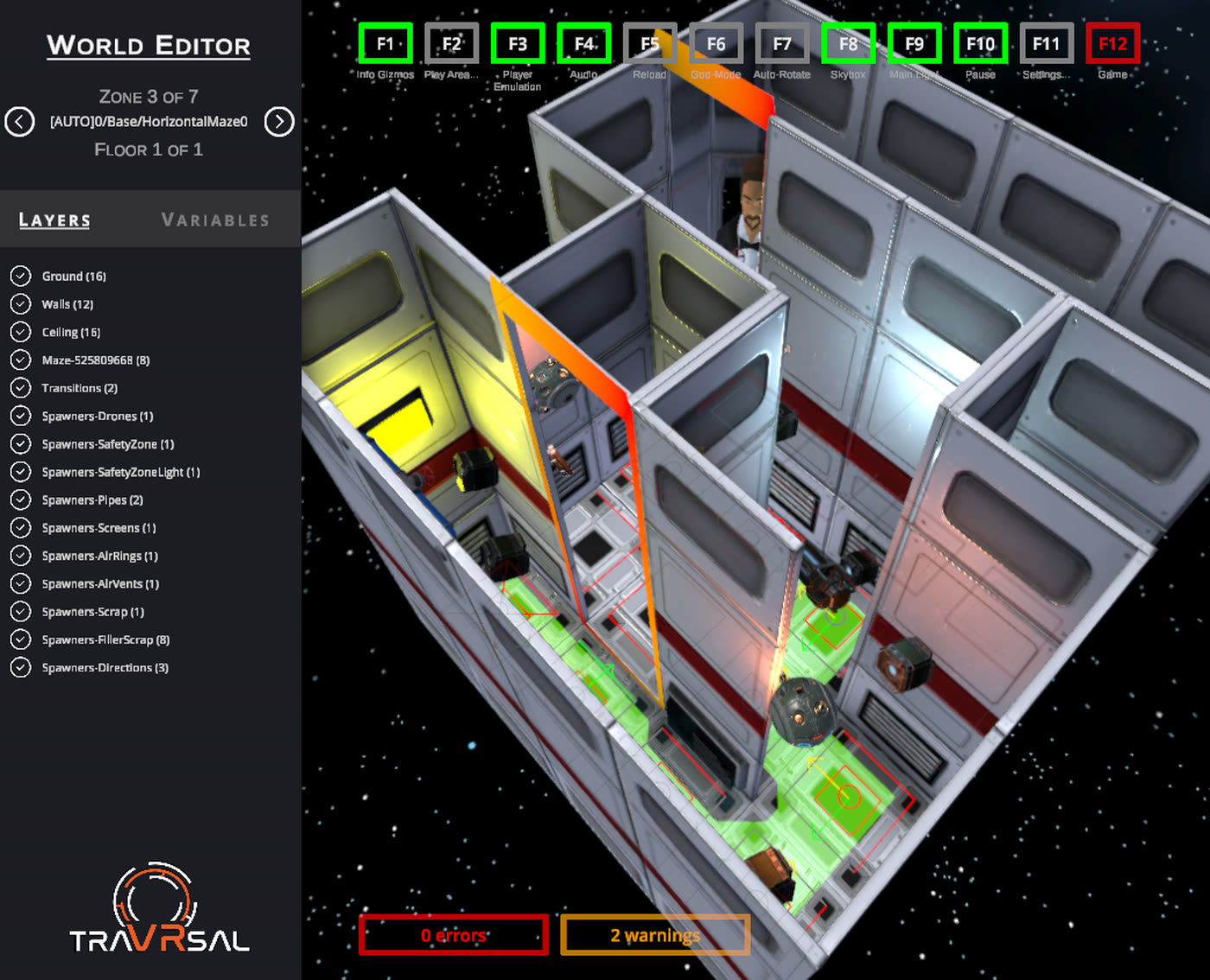
A structural preview is especially valuable for impossible spaces because the final route is not necessarily one static building. You need to reason about allowed combinations and constraints, not only about the transform of one object in one scene.
A creator workflow from idea to doorway
- Choose the physical experienceDecide what the player should do with real steps, turns, reaches and thresholds. Define the minimum space before building detail.
- Prototype one local zoneEstablish scale, interaction and visual language in Unity. Test the room from a first-person headset perspective early.
- Define transitions and constraintsMark valid connections, clearance and the rules that let the runtime place one zone after another.
- Add variation deliberatelyChoose which parts may be generated, reordered or populated from data and which landmarks must remain authored.
- Inspect and validateUse the available creator tools to find missing references, invalid connections and configurations that do not fit supported spaces.
- Test on Meta QuestWalk the experience near its minimum dimensions and in different rectangles. Check pacing, boundaries, transitions and performance.
Start small. One polished loop through three distinctive zones teaches more about room-scale flow than a large collection of unfinished rooms. Once the physical rhythm works, expand the world with optional branches, variations and new mechanics.
Test, package, publish and keep listening
A creator build is complete only after it has been walked. Desktop preview can verify geometry and logic, but it cannot reproduce the exact relationship between a Quest boundary, the player’s body and an adaptive route. Test on supported hardware and include the smallest play space your world claims to support.
When the world is ready, follow the current packaging and submission process documented with the SDK and creator community. The details can change as the platform evolves, so the repository and traVRsal Discord are better sources than a static checklist for final commands or review steps.
Community feedback is part of world building. Players will reveal sightlines you missed, interactions that need more space and moments where a portal is especially convincing. Iteration turns a technical impossibility into a place people remember.
Creators can also use the creator login for the existing account and world-management workflow. Public documentation starts on GitHub; discussion, troubleshooting and early feedback happen in Discord.
VR world-builder questions
Can I build a traVRsal world in Unity?
Yes. The public traVRsal SDK provides the Unity-side workflow for creating zones, content and world packages for the platform.
Can worlds be handcrafted or procedural?
Both approaches are supported. Creators can author deliberate zones and connections, use procedural rules, or combine fixed story spaces with adaptable routes.
What is traVRsal Studio?
traVRsal Studio is the companion workflow for inspecting world structure, connected zones, layers, variables and validation information.
Do I need a Meta Quest headset to create a world?
Unity and Studio support much of the authoring workflow, but testing the final room-scale experience on supported Meta Quest hardware is an essential publishing step.
How are community worlds published?
Creators build and validate a world package, test it on device and use the current creator workflow. The SDK documentation and Discord provide the latest submission details.
Where can creators get help?
Start with the public GitHub SDK and its documentation, then join the traVRsal Discord to ask questions, share progress and meet other world builders.
Your world starts locally
Build a room that could never exist.
Open the public SDK, prototype the first threshold and bring your idea to the creator community.